


If your computer often shows a website containing the text: “Error # DW6VB36“, explaining that you need to call a toll phone number in order to fix your computer, there is no doubt that you have been infected with an adware.

According to this message, the phone number included belongs to Microsoft’s tech support service. Nothing but lies of course! Microsoft will never send unwanted e-mails nor will request your payment information (credit cards and such) by phone in order to repair your computer. Be very careful with this sort of messages, 99.99% of them are frauds.
Error DW6VB36 is caused by an adware installed on your computer. This kind of adware is linked to some other free program downloaded from the net. When installing a new program on your computer you must always pay attention to anything offered as optional. By carefully reading everything written on every stage of the install process you can detect anything you don’t need nor want so you can stop it from being installed.
Error DW6VB36, is nothing but a phishing attempt, looking to steal your bank data and to install an unwanted program in your computer. You can be sure by seeing this Error DW6VB36 message that you’re infected, with the help of our guide you’ll easily fix this issue.

How to remove DW6VB36 ?
Remove DW6VB36 with MalwareBytes Anti-Malware
Malwarebytes Anti-Malware is a light-weight anti-malware program that is excellent at removing the latest detections.
-
Download Malwarebytes Anti-Malware to your desktop.
Premium Version Free Version (without Real-time protection) - Install MalwareBytes Anti-Malware using the installation wizard.
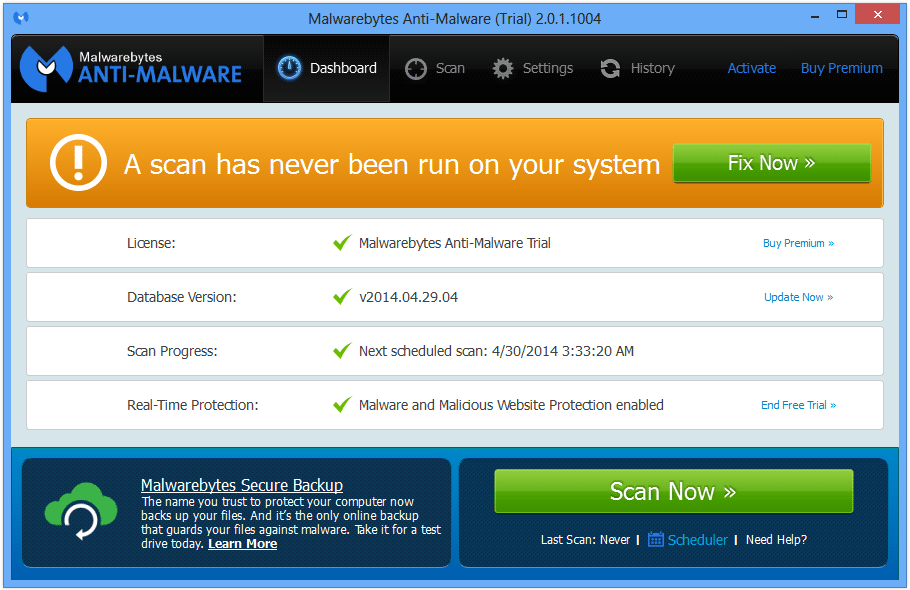
- Once installed, Malwarebytes Anti-Malware will automatically start and you will see a message stating that you should update the program, and that a scan has never been run on your system. To start a system scan you can click on the Fix Now button.
- If an update is found, you will be prompted to download and install the latest version.
- Malwarebytes Anti-Malware will now start scanning your computer for DW6VB36.
- When the scan is complete, make sure that everything is set to Quarantine, and click Apply Actions.
- When removing the files, Malwarebytes Anti-Malware may require a reboot in order to remove some of them. If it displays a message stating that it needs to reboot your computer, please allow it to do so.
Remove DW6VB36 with AdwCleaner
AdwCleaner is a useful tool designed to eliminate unwelcome toolbars, browser hijackers, redirects and potentially unwanted programs (PUPs) in Internet Explorer, Firefox, Chrome or Opera. AdwCleaner needs no set up and can be ran in a instant to scan your system.
-
Please download AdwCleaner by Xplode and save to your Desktop :
Download AdwCleaner - Double-click on AdwCleaner.exe to run the tool (Windows Vista/7/8 users : right-click and select Run As Administrator).
- Click on the Scan button.
- After the scan has finished, click on the Clean button..
- Press OK again to allow AdwCleaner to restart the computer and complete the removal process.
Click here to go to our support page.